
Project management has always been about planning, tracking, and guiding teams toward delivery. Today, artificial intelligence is changing how this work gets done. From planning schedules to tracking risks, AI helps project managers save time, reduce errors, and focus more on people and outcomes rather than manual tasks.
Recent research by PMI’s “Shaping the Future of Project Management With AI” highlights the growing role of AI in project management. 21% of respondents say they are already using AI, while 82% of senior leaders believe AI will impact projects. Even more telling, 91% of respondents believe AI will shape the project management profession.
In this article, we are going to see how AI contributes to PM and its types, tools, and best practices.
What AI Means for Project Management?
AI in project management refers to software that can learn from project data, spot patterns, and support better decisions. Instead of manually updating schedules or tracking risks, project managers can rely on AI to handle routine work and highlight issues early.
AI does not replace project managers. It supports them by handling repetitive tasks and offering data-driven suggestions. Human judgment (The Most Valuable Skill in an AI-Driven World) still guides priorities, team care, and final decisions.
Types of AI Applications in Project Management
AI supports project work in several practical ways. Each type focuses on a specific area of daily project activity.
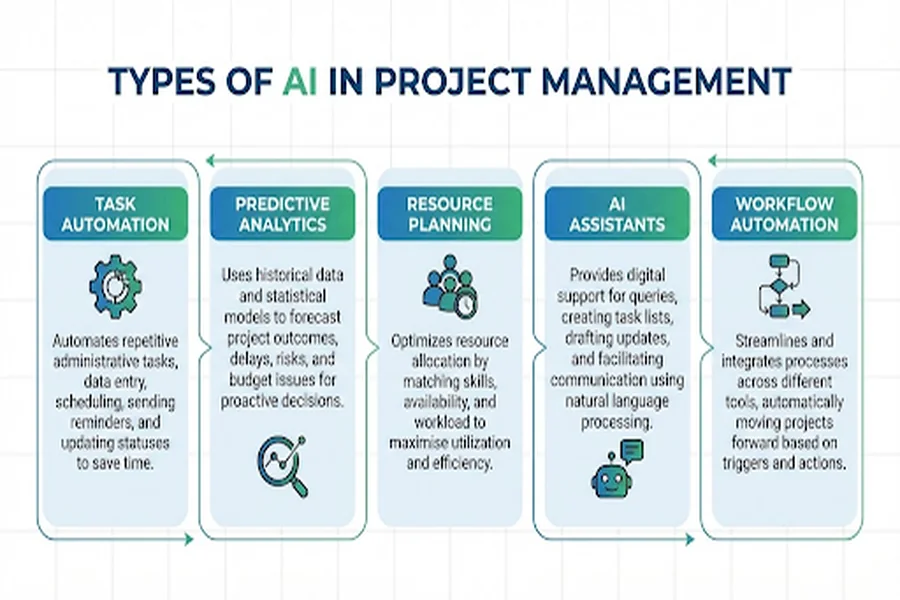
1. Task Automation
AI can assign tasks, send reminders, and prepare status updates automatically. This reduces time spent on admin work and keeps teams informed without constant follow-ups.
2. Predictive Analytics
AI studies past project data to estimate timelines, cost risks, and delivery delays. It helps project managers see problems before they happen.
3. Resource Optimization
AI reviews team availability, skills, and workloads to suggest better task assignments. This avoids burnout and improves delivery speed.
4. Intelligent Assistants
AI assistants answer questions, summarize project updates, and help write content like reports or meeting notes.
5. Workflow Automation
AI connects tools and automates actions across systems. When one task updates, related tools update automatically.
Popular AI-Powered Project Management Tools
AI tools are transforming how teams plan, track, and deliver work. Below are well-known tools that use AI in practical ways, with a clear explanation of what each offers and why teams choose them.
1. Asana
| AI for Planning and Productivity |
Asana uses intelligent technology to help teams plan and set goals faster. Its AI features can suggest how to organize work, recommend due dates, and offer insights on where teams might be falling behind.
How it helps:
- Automatic task suggestions based on past patterns
- Recommended project layouts depending on team needs
- Alerts for overdue or at-risk work
Use case: A marketing team uses Asana’s suggestions to prioritize weekly tasks, saving time in planning meetings.
2. ClickUp
| Custom AI With Writing and Query Tools |
ClickUp’s AI is designed to help with writing, summarizing, and organizing project details. It can draft task descriptions, capture updates, and generate concise summaries from meeting notes.
How it helps:
- Instant task descriptions from simple prompts
- Automated reminders and workflow rules
- Quick answers about project status
Use case: A product team uses ClickUp AI to turn discussion notes into clear tasks, reducing manual documentation work.
3. Motion
| Smart Scheduling and Planning |
Motion uses AI to manage time and space on your calendar. It adjusts tasks automatically when plans change, helping teams stay on track without constant manual updates.
How it helps:
- Automatic rescheduling based on priority changes
- Time block suggestions for deep work
- Calendar-based planning without spreadsheets
Use case: A consulting team uses Motion to reschedule tasks when client calls overlap, saving hours every week.
4. Wrike
| Predictive Risk and Project Health Tracking |
Wrike uses machine learning to analyze project data and predict potential risks like late deadlines or budget issues. It gives managers early warnings to steer work back on track.
How it helps:
- Risk alerts before problems become critical
- Visual dashboards showing project health
- Suggested changes based on patterns
Use case: A software team uses Wrike to spot potential delays before sprint reviews, allowing early course corrections.
5. Notion
| Unified Workspace With AI Assistance |
Notion combines notes, databases, tasks, and AI writing help in one place. Its AI can draft content, summarize long pages, and connect project data across workspaces.
How it helps:
- Summarize project discussions quickly
- Generate drafts for reports or meeting notes
- Link planning pages and workflows
Use case: A remote team uses Notion AI to summarize weekly updates and share them with stakeholders without extra work.
6. Trello (Butler AI)
| Board-Level Automation |
Trello is known for card-style boards. Its integrated automation, Butler AI, can trigger actions when conditions change; for example, move a task when it’s marked done, or remind a teammate when a deadline nears.
How it helps:
- Automations based on simple rules
- AI-driven card text suggestions
- Better team flow with fewer manual steps
Use case: An events team uses Trello automations to keep tasks moving from planning to execution without constant oversight.
7. Taskade
| AI Agents for Collaboration |
Taskade offers a space where AI assists teamwork through real-time collaboration. Its agents can help outline tasks, plan priorities, and co-author documents with your team.
How it helps:
- Instant task list generation from simple prompts
- Real-time suggestions during group work
- Structured outlines for complex goals
Use case: A startup team uses Taskade to co-plan product launches together and generate clear task lists in real time.
8. Forecast
| Machine Learning for Resource Plans |
Forecast uses machine learning to analyze past project performance and predict future needs. It helps teams optimize resource allocation, meaning the right people are placed on the right work at the right time.
How it helps:
- Smart predictions on project timelines
- Suggestions for who should work on which tasks
- Scenario planning with data guidance
Use case: A services team uses Forecast to plan billable hours, ensuring teams are neither overloaded nor idle.
Best Practices for Using AI in Project Management
Using AI works best when teams follow a clear and thoughtful approach.
1. Define Clear Goals
Start by identifying problems AI should help solve, such as reducing meeting time, improving schedules, or tracking risks better.
2. Start Small
Test AI tools on one project or team first. This helps teams learn without pressure and shows what works.
3. Choose the Right Tools
Select tools that fit current workflows and integrate with existing systems. Avoid tools that add extra steps.
4. Automate Repetitive Work
Use AI for scheduling, reminders, reporting, and updates. This frees project managers to focus on planning and team support.
5. Encourage Team Collaboration
Teams should work with AI suggestions, not blindly accept them. Discussion improves results.
6. Train and Upskill Teams
Basic AI knowledge helps teams use tools better. Simple training on prompts and tool features goes a long way or Opting for PMP certification training is a life-changing choice for professionals.
| Project Managers gain structured thinking that helps them use AI tools wisely, not blindly. |
7. Keep Human Oversight
AI provides suggestions, not final answers. Project managers should always review major decisions.
8. Review and Improve Regularly
Track how AI tools perform and adjust settings or processes as projects evolve.
Benefits and Limits of AI in Project Management:
AI improves speed, planning accuracy, and visibility. Teams spend less time chasing updates and more time solving real problems.
At the same time, AI depends on data quality. Poor data leads to weak suggestions. This is why human review and experience remain essential.
Final Thoughts
AI is becoming a practical partner in modern project management. It helps teams plan better, spot risks earlier, and reduce routine work. When used with clear goals and human judgment, AI supports smarter delivery without removing the human side of project leadership.
The real question isn’t whether AI belongs in project management; it’s how well teams learn to use it wisely.
